School visitor management access control is defined as an integrated system that automates visitor check-in, verifies identities against security databases, controls physical door access, and tracks visitor movement across a campus in real time. As of 2026, 85% of school districts use some form of visitor management system to strengthen campus security. That adoption rate reflects a clear shift away from paper sign-in sheets toward technology-driven entry control. Yet 43% of schools still rely on manual check-in processes, which means a significant share of campuses remain exposed to unauthorized access. The PASS K-12 7th Edition standard now formally recommends a tiered approach that combines electronic visitor management with badging and database cross-referencing, giving administrators a clear benchmark to work toward.
What are the essential components of school visitor management access control?
A complete visitor management system for schools combines hardware, software, and physical zoning into one coordinated entry process. Each component plays a specific role, and gaps in any one area weaken the entire system.
Digital check-in kiosks and identity verification
The check-in kiosk is the first point of contact for every visitor. Tablet-based kiosks are the most practical choice for most schools because they require fewer peripherals, cost less to maintain, and are easier for front office staff to manage than traditional Windows-based terminals. During check-in, the system captures a government-issued ID, runs the visitor’s name against sex offender registries, and cross-references custom alert lists to flag individuals who should not be on campus. A flagged visitor triggers an automated alert to security personnel before any access is granted.

Electronic door locks and access credentials
Once a visitor clears screening, the system communicates directly with electronic door hardware. Integrating visitor check-in with electronic door locks means a door unlocks only after the system confirms visitor clearance. Magnetic locks, electric strikes, and credential readers are the most common hardware choices in school environments. The visitor receives a printed or digital badge that encodes their access permissions, limiting where they can go and for how long.
Zoning: perimeter, public, and private areas
Effective school access control uses zoning to separate three distinct areas: the Perimeter zone (building exterior and main entry), the Public zone (lobby, main office), and the Private zone (classrooms, administrative offices, server rooms). Visitors are authorized only for the zones their purpose requires. A parent picking up a child, for example, stays within the Public zone and never gains access to Private areas. This zoning structure is the single most effective way to limit visitor movement without requiring constant staff supervision.
The table below outlines the core components of a school visitor management system, their function, and typical annual cost ranges.
| Component | Purpose | Typical Annual Cost |
|---|---|---|
| Tablet check-in kiosk | Visitor registration and ID capture | Included in software license |
| Visitor management software | Screening, badging, and log management | $600–$1,800 per year |
| Electronic door locks | Controlled entry after visitor clearance | Hardware cost varies |
| Visitor badges (printed or digital) | Access credential and identification | Low per-unit cost |
| Alert and notification system | Flags unauthorized or flagged individuals | Included in software |
Annual software licensing costs for visitor management systems range from $600 to $1,800 depending on school size and feature bundle. That range makes the technology accessible even for schools with limited security budgets.
How to integrate visitor management systems with existing school security infrastructure
A visitor management system delivers its full value only when it connects to the other security layers already in place. Standalone check-in software that does not communicate with door hardware, cameras, or emergency alert systems creates gaps that a determined intruder can exploit.
The most critical integration point is the link between visitor check-in and door lock control. When these two systems communicate, a cleared visitor triggers an unlock command to the specific door they need. No clearance means no entry, regardless of whether staff are watching the front desk. This removes the single largest vulnerability in manual entry processes: the unlocked door that anyone can walk through while the receptionist is occupied.
Linking visitor logs to video surveillance adds a second layer of verification. When an incident occurs, security personnel can pull the visitor log and match it against camera footage within seconds. Schools that have integrated surveillance with visitor tracking report faster incident resolution because the data trail is already organized and time-stamped.
Data governance is a non-negotiable part of any integrated system. Schools must establish clear data retention policies and restrict access to visitor logs to authorized personnel only. Storing visitor data longer than necessary creates both a privacy liability and a compliance risk under state education privacy laws. A well-designed system collects only what it needs and purges records on a defined schedule.
Cloud-based platforms offer the most practical path to scalability. A cloud-hosted visitor management system allows administrators to monitor multiple entry points across a large campus from a single dashboard, push software updates without on-site IT visits, and generate compliance reports on demand.
Pro Tip: Before going live, run a full end-to-end test with staff acting as visitors. Walk through every zone transition, trigger a flagged-visitor alert, and verify that door locks respond correctly. Catching workflow gaps during testing costs nothing. Catching them during a real incident costs everything.
Key integration priorities for school administrators include:
- Synchronize visitor check-in with electronic door lock controls at every entry point.
- Connect visitor logs to the campus video surveillance system for real-time and historical verification.
- Establish written data retention and access policies before the system goes live.
- Choose a cloud-based platform that supports real-time monitoring across multiple buildings.
- Confirm that the visitor management system can trigger your existing emergency alert or lockdown protocol.
How to implement a school visitor management access control system step by step
Deploying a visitor management system is a phased process. Rushing any phase creates operational problems that are difficult to fix after installation.
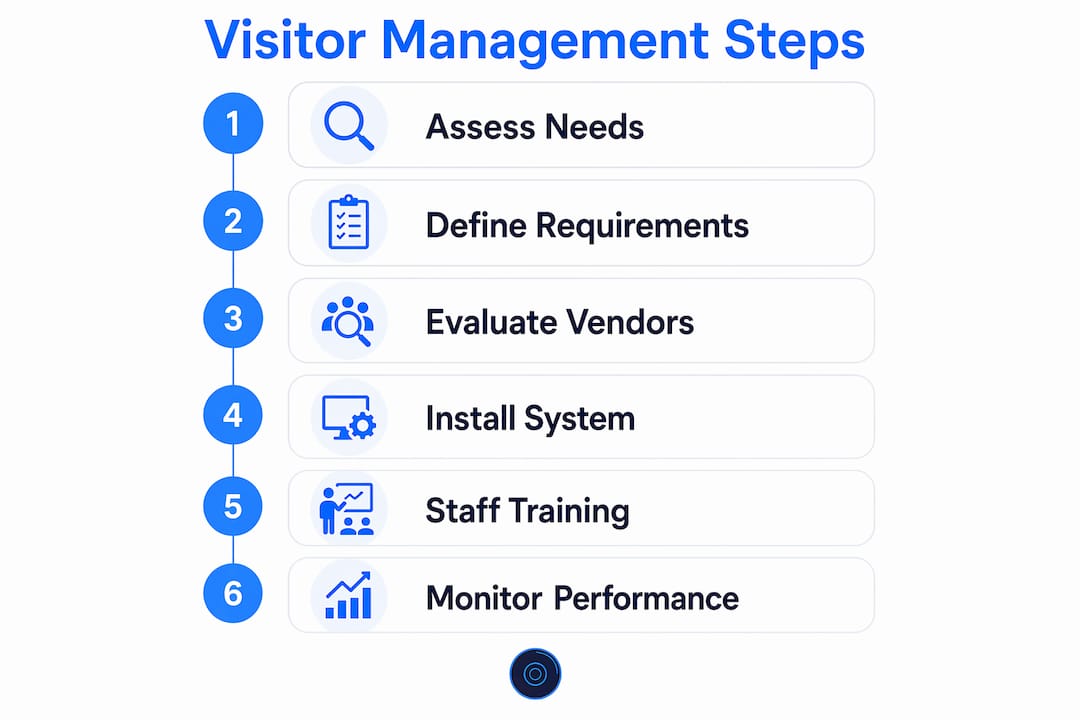
Phase 1: Assess your security needs and visitor traffic patterns. Start by mapping every entry point on your campus and counting average daily visitor volume by entry. Identify which zones require the strictest access restrictions and where your current process creates the most risk. This assessment shapes every hardware and software decision that follows.
Phase 2: Define your hardware and software requirements. Match your hardware choices to your building’s physical layout. A single-building elementary school needs a different configuration than a multi-building high school campus. Tablet kiosks work well for most front office environments. Larger campuses may need multiple check-in stations and a centralized management dashboard. Budget for access control system costs that include both hardware and annual software licensing.
Phase 3: Evaluate vendors on reliability, support, and integration capability. The vendor you choose must be able to integrate with your existing door hardware and surveillance infrastructure. Ask specifically about their response time for technical support, their update schedule, and whether their system supports role-based access control. Role-based access control limits each user and visitor to only the permissions their role requires, which is the foundation of a least-privilege security model.
Phase 4: Install and configure the system with your security integrator. A licensed low-voltage contractor handles the physical installation of door hardware, credential readers, and kiosk mounting. Software configuration includes setting up zone permissions, alert thresholds, and badge templates. Schools in New Jersey can also reference school security specialists in NJ for regional installation guidance.
Phase 5: Train front office and security staff. Training covers daily check-in procedures, how to respond to flagged-visitor alerts, and how to initiate a lockdown through the system. Staff who understand the system’s logic make fewer errors and respond faster in emergencies.
Phase 6: Monitor performance metrics after go-live. Track daily visitor volume, alert frequency, average check-in time, and any hardware failures. Review these metrics monthly for the first quarter to identify bottlenecks and confirm the system performs as designed.
Pro Tip: Avoid systems that require a dedicated IT administrator to manage routine tasks. The best visitor management platforms are designed for front office staff, not IT professionals. If your staff cannot reset a badge printer or pull a visitor report without calling for help, the system is too complex for daily school operations.
Common pitfalls to avoid include selecting a system that cannot integrate with your existing door hardware, underestimating staff training time, and skipping the data governance policy before launch. Each of these mistakes creates a security gap that negates the investment.
How to troubleshoot and maintain reliable visitor management access control
Operational reliability is what separates a functional security system from one that staff work around. When a kiosk crashes or a badge printer jams, front office staff revert to paper sign-in sheets, and the entire access control layer collapses.
Simplified hardware setups reduce downtime significantly. iPad-based kiosks with minimal peripherals fail less often than complex Windows terminals with multiple connected devices. When hardware does fail, a simpler setup is faster to diagnose and replace. Schools that switched from Windows-based kiosks to tablet setups reported measurable improvements in system uptime and a reduction in IT support calls.
Key maintenance and troubleshooting practices for school administrators:
- Schedule quarterly hardware inspections covering kiosks, badge printers, credential readers, and door lock hardware.
- Confirm that software updates are applied on a defined schedule, not only when problems arise.
- Review visitor data retention logs every 90 days and purge records according to your written policy.
- Conduct annual staff refresher training to address procedural drift and introduce any new system features.
- Test flagged-visitor alert workflows at least twice per year to confirm notifications reach the right personnel.
- Address tailgating risk at every controlled entry point by pairing electronic locks with door position sensors that alert staff when a door is held open beyond a set time.
Vendor support responsiveness is a selection criterion, not an afterthought. A vendor that takes 48 hours to respond to a hardware failure leaves your campus exposed for two full school days. Confirm support response time commitments in writing before signing any contract. For schools in Manhattan, Brooklyn, Queens, and Staten Island, working with a local security integrator means faster on-site response when remote support is not enough. Review the signs your access control needs replacement to know when maintenance is no longer enough and a full upgrade is the right call.
Key Takeaways
Effective school visitor management access control requires integrating digital check-in, identity verification, zone-based door control, and surveillance into one coordinated system backed by clear data governance policies.
| Point | Details |
|---|---|
| Adoption is high but gaps remain | 85% of districts use visitor management systems, yet 43% still rely on manual check-in processes. |
| Zoning defines visitor boundaries | Separating Perimeter, Public, and Private zones limits visitor movement without constant staff supervision. |
| Integration multiplies security value | Connecting check-in to door locks and surveillance creates a unified system that closes manual entry gaps. |
| Hardware simplicity improves reliability | Tablet kiosks with minimal peripherals reduce downtime and lower IT maintenance demands. |
| Data governance is a legal requirement | Schools must define retention schedules and restrict log access before any system goes live. |
YDA Security Systems NYC: access control and visitor management for NYC schools
YDA Security Systems NYC installs and configures school access control systems across Manhattan, Brooklyn, Queens, and Staten Island, with licensed and insured technicians who specialize in low-voltage security integration. Our team handles the full scope of a visitor management deployment, from electronic door lock installation and credential reader wiring to kiosk mounting and system configuration. We work with your existing infrastructure to build a unified security ecosystem that meets PASS K-12 standards and your district’s specific entry requirements. With over 5,000 satisfied clients and a 1-year warranty on all installations, YDA Security Systems NYC delivers systems that front office staff can operate confidently every day. Contact us through our services page to schedule a consultation for your school.
FAQ
What is school visitor management access control?
School visitor management access control is a system that automates visitor check-in, verifies identities against security databases, and controls physical door access in real time. It replaces manual sign-in sheets with a digital process that screens, badges, and tracks every visitor on campus.
How much does a school visitor management system cost?
Annual software licensing for visitor management systems typically ranges from $600 to $1,800 per school, depending on campus size and the features included. Hardware costs for door locks, credential readers, and kiosks are separate and vary by installation scope.
What is the PASS K-12 standard for visitor management?
PASS K-12 7th Edition recommends a tiered security approach that includes electronic visitor management with badging and database cross-referencing as a best practice for school entry control. It is the leading industry guideline for K-12 physical security in the United States.
How does zoning work in school access control?
Zoning divides a school campus into Perimeter, Public, and Private areas, each with defined access permissions. Visitors are authorized only for the zones their visit requires, which prevents unauthorized movement into classrooms or administrative areas.
How do schools prevent tailgating at controlled entry points?
Schools pair electronic door locks with door position sensors that trigger an alert when a door is held open beyond a set time. This automated detection removes the reliance on staff observation to catch unauthorized individuals following a cleared visitor through a secured door.