
A mobile app intercom pairs a building’s door station with a smartphone app so residents and managers can see, hear, and unlock the door from anywhere. For managed properties handling regular deliveries and visitors, a professionally installed IP intercom with mobile app integration is the right call. Get it commissioned and documented against recognized standards, not just plugged in.
TL;DR:
- Mobile app intercoms are most cost-effective in buildings with high delivery volumes, multiple entry points, or on-site staff, providing remote verification and management.
- Hardware must meet local and national standards, including NYC’s device placement rules and NFPA 731 and UL 294 benchmarks, with confirmation through documented testing.
- Proper installation requires a thorough site survey, wiring, hardware selection, network configuration, and commissioning reports to ensure reliable operation and future serviceability.
- Fallback options like landline calls and local door releases are essential for residents who do not have smartphones or during network outages.
- System costs vary based on building size, existing infrastructure, and hardware choices, with timelines ranging from quick residential installs to more extensive commercial setups.
Table of Contents
- What Does a Mobile App Intercom Do for Your Building?
- What Codes and Standards Apply to Installed Intercoms?
- Procurement and Installation Checklist for App-Based Intercoms
- How Installation, Commissioning, and Maintenance Actually Work
- Get a Professionally Installed Mobile App Intercom From YDA Security Systems NYC
- Standards and Codes Referenced in This Guide
- Sources
- FAQ
What Does a Mobile App Intercom Do for Your Building?
A mobile app intercom moves the classic lobby handset onto a smartphone. Instead of a resident walking to a wall unit, the call rings their phone with live video and audio, and they release the door with a tap. That single change reshapes daily traffic in ways worth understanding before you sign a contract.
The core feature set on any serious system includes:
- Video and audio calling routed directly to a resident’s or manager’s phone
- Remote door release triggered from the app, not just from inside the unit
- Temporary access codes or QR codes for couriers, contractors, and guests
- Admin dashboards showing call logs, access history, and user permissions
The verification and unlock decision now happens over a data connection instead of a hardwired intercom line, and that shift makes network performance a genuine design factor. Latency, camera clarity, and microphone quality determine whether a resident can actually recognize who’s at the door before buzzing them in. A buyer’s guide on multifamily mobile-access intercoms notes that connectivity fallback and clear audio are standard expectations, not premium add-ons, in any system worth specifying.
Mobile app intercoms earn their cost fastest in buildings with heavy delivery volume, distributed on-site staff, or multiple entry points that need centralized management. A doorman building with one lobby door has less to gain than a 40-unit walk-up where the super can’t always answer the buzzer.
Not every resident carries a smartphone, or wants to use one for this. A properly specified system includes phone-call fallback, so a call routes to a landline or secondary number if the app doesn’t respond, keeping the in-unit release capability required under local rules intact for every resident, app or no app.
What Codes and Standards Apply to Installed Intercoms?
Mobile convenience doesn’t override the physical requirements that govern intercom hardware in multiunit buildings. New York City’s own rule is specific on this point: buildings must provide two-way intercommunication and let occupants release the main entrance lock from inside their dwelling unit, with device placement and height requirements spelled out in 1 RCNY §42-01. An app on someone’s phone doesn’t satisfy that requirement on its own; the in-unit release path still has to exist.
Two national standards shape how installers should approach the rest of the system:
- NFPA 731 covers installation, testing, inspection, and maintenance for premises security systems, with a dedicated chapter on electronic access control that installers should be following for commissioning plans.
- UL 294 sets construction and performance benchmarks for access-control units, defining tiered performance and testing expectations for door-release hardware.
A number worth remembering: these two standards, NFPA 731 and UL 294, are the pair most installers and inspectors reference together when evaluating whether a security or access-control installation was done to a documented, testable standard rather than assembled on guesswork.
The practical takeaway for an owner reviewing a proposal: ask for a written test plan, a maintenance contract, and confirmation that any egress-critical door retains a local override that works even if the network or app fails.
Procurement and Installation Checklist for App-Based Intercoms
Specifying a mobile app intercom system means evaluating hardware most owners never think about until it fails. Here’s the order that matters:
- Outdoor station hardware. Confirm camera resolution, microphone and speaker clarity, an appropriate ingress protection rating for weather exposure, vandal resistance, and credential options (fob, code, mobile) at the mounting point.
- Door-release hardware. Decide between an electric strike, a magnetic lock, or a monitored release, and coordinate with egress requirements so a power failure or network outage never traps anyone inside.
- Network and power. Most modern stations run on Power over Ethernet, so confirm your wiring can carry both power and data, then set real bandwidth and latency targets for video calls. Ask about VLAN segmentation, firewall rules, and a cellular backup path if your building’s internet goes down.
- Software and admin controls. Look for tenant self-provisioning, PIN and QR temporary access flows, exportable logs for audits, and role-based permissions so a super and a property manager don’t have identical access.
- Testing and commissioning. Request a written acceptance checklist and as-built wiring diagrams before final sign-off, not after.
Pro Tip: Ask any installer bidding on the job to show you a sample commissioning report from a past project. If they can’t produce one, that tells you how the maintenance conversation will go later.
Skipping the network step is the single most common mistake owners make. A camera can be flawless and still deliver a useless video call over a saturated internet connection during peak delivery hours.
How Installation, Commissioning, and Maintenance Actually Work
A proper mobile app intercom installation follows a sequence, and skipping steps is where most long-term problems start. Every project is run through a site survey first, checking existing wiring, door hardware condition, and network capacity before any equipment goes in. From there, technicians handle structured cabling or PoE provisioning, mount and wire the outdoor station and door-release hardware, and integrate the panel with the building’s access control setup.
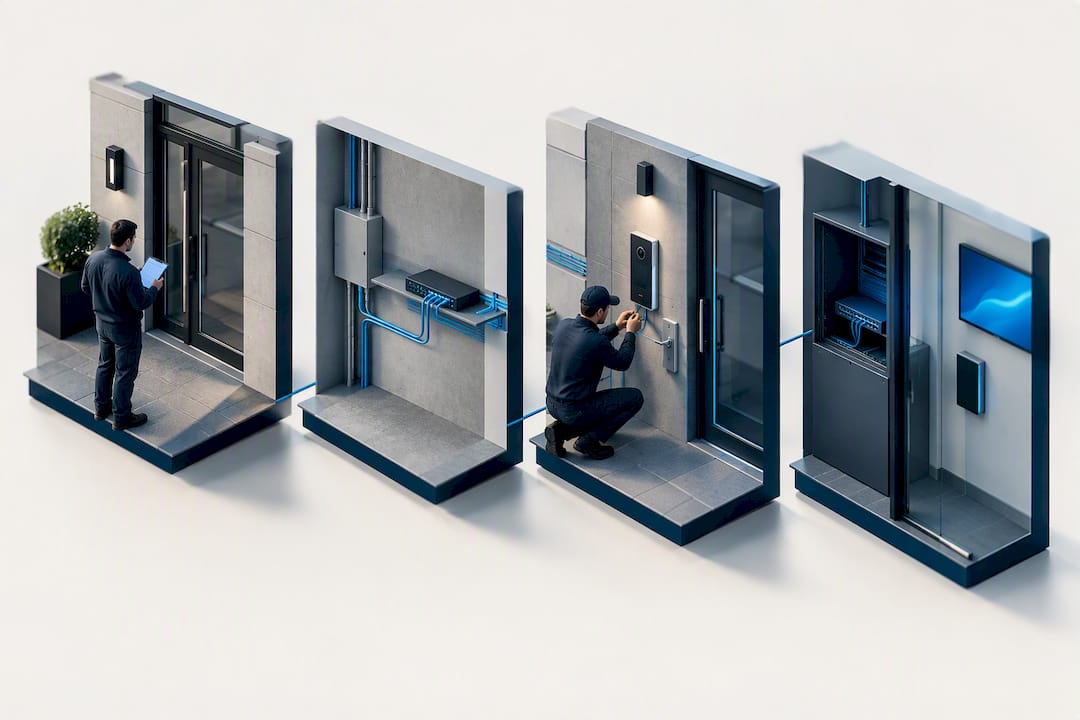
App registration and tenant provisioning happen before handoff, not after, so residents aren’t left figuring out login screens on their own. The final step is commissioning: a documented test of every call path, release mechanism, and fallback option.
What you should expect as deliverables when the work is done:
- A commissioning report showing every device tested and its result
- Test logs and as-built wiring diagrams for future service calls
- Written user instructions for residents and building staff
- A maintenance schedule with defined service intervals
YDA Security Systems NYC installs with licensed and insured technicians and backs every installation with a one-year warranty, so if a component fails or a setting drifts, there’s a defined path to get it fixed rather than a guessing game.
Pro Tip: Keep your commissioning report and as-built diagrams somewhere the building superintendent can find them fast. Half the service calls we run start with someone hunting for paperwork that should have been handed over on day one.
In New York specifically, device placement and reachability aren’t optional design choices. Working with a technician who understands both the building department’s expectations and how mobile integration layers on top of that baseline saves owners from redoing work later.
Get a Professionally Installed Mobile App Intercom From YDA Security Systems NYC
Reading feature lists online only gets you so far when the real question is who’s going to wire, mount, and commission the system correctly. Mobile app intercom systems are installed and serviced across Manhattan, Brooklyn, Queens, and Staten Island by licensed and insured technicians handling everything from structured cabling to app provisioning, with a one-year warranty on the finished installation.
Whether you’re replacing an aging buzzer system in a walk-up or specifying a multi-door setup for a commercial property, the process starts with a site survey to assess your existing wiring, door hardware, and network capacity. From there, we build a specification, schedule the installation, and close the job with documented commissioning so you have the paperwork to prove the system works as designed.
If your building needs remote verification and door release that actually holds up under daily use, schedule an intercom installation with YDA Security Systems NYC and get a straightforward quote before you commit to any vendor.
Standards and Codes Referenced in This Guide
The requirements covered here come from primary sources worth keeping on file if you’re managing a procurement process:
- 1 RCNY §42-01 sets NYC’s device and release requirements for multiunit buildings.
- NFPA 731 governs installation, testing, and maintenance of premises security systems.
- UL 294 defines performance and construction standards for access-control hardware.
Ask any installer bidding on your project to show commissioning documentation aligned with these three references before you sign off.
Sources
FAQ
What Is a Mobile App Intercom System?
A mobile app intercom is a door-entry system where the video and audio call, along with the door release function, routes to a smartphone app instead of a wall-mounted handset. It still requires physical hardware at the door and often a wired connection back to a network switch or panel.
Do Mobile App Intercoms Meet NYC Building Code?
The hardware and in-unit release capability must meet 1 RCNY §42-01 regardless of whether an app is layered on top. A compliant installation keeps a functioning in-unit release path even if the mobile app fails or a resident doesn’t have a smartphone.
How Much Does a Mobile App Intercom Installation Cost?
Pricing depends on the number of doors, existing wiring condition, and hardware selected, so current pricing is available directly through YDA Security Systems NYC’s intercom installation page rather than a flat rate quoted here.
How Long Does Installation and Commissioning Take?
Timelines vary with building size and existing infrastructure, but the process generally moves from site survey to specification, then installation, then documented commissioning before resident handoff. A single-door residential job typically moves faster than a multi-door commercial deployment requiring network upgrades.
What Happens if the App Loses Connectivity?
A properly specified system includes phone-call fallback and a local in-unit release, so residents aren’t locked out of communicating with visitors during an outage. This fallback requirement is part of why NFPA 731 commissioning checks confirm every call path, not just the primary one.

