
For most multifamily buildings, a video-capable IP intercom is the baseline choice. Cloud/mobile platforms fit mobile-first portfolios, telephone entry suits low-internet or senior communities, and analog stays limited to tight-budget retrofits where rewiring isn’t realistic.
Here’s the quick mapping:
- Small single-entry buildings: a wired or wireless IP panel with mobile unlock covers most needs without heavy infrastructure.
- Mid-size buildings with mobile-first tenants: cloud-managed video intercom with app-based visitor access and delivery logging.
- Large or multi-entrance portfolios: telephone entry or enterprise IP systems with centralized management across every door.
This guide walks through installed costs, a procurement checklist, integration options, and the maintenance routine that keeps an apartment video intercom system running for years, not months.
Key Takeaways
A video-capable IP intercom is the right baseline for most multifamily buildings, with telephone entry reserved for low-internet or senior communities and analog limited to tight-budget retrofits.
| Point | Details |
|---|---|
| Video is the new baseline | Audio-only buzzers are being phased out in favor of video verification at the door. |
| PoE budgeting drives reliability | Undersized PoE capacity causes most intermittent intercom failures installers encounter. |
| UPS backup is not optional | Battery backup for panels and PoE switches keeps entry systems working during outages. |
| Documentation protects your investment | Require wiring diagrams, acceptance tests, and firmware policies before signing off on install. |
| YDA Security Systems NYC handles the full scope | Licensed technicians provide site surveys, installation, testing, and a one-year warranty across NYC boroughs except the Bronx. |
Table of Contents
- Why Video Intercoms Matter for Security and Operations
- What Types of Intercom Systems Exist, and Which One Fits Your Building?
- What Should Be on Your Installation Checklist?
- How Do You Choose the Right Vendor and System?
- What Does an Apartment Video Intercom Cost to Install?
- Field-Tested Troubleshooting and Maintenance Guidance
- How Intercoms Integrate With Access Control, VMS, and Property Management Software
- Get a Site Survey From a Licensed NYC Installer
- Sources
- FAQ
Why Video Intercoms Matter for Security and Operations
Video changes what a resident can actually verify before opening a door. Audio-only buzzers ask tenants to trust a voice; video lets them see a face, a delivery uniform, or a stranger loitering near the vestibule. That single upgrade closes off one of the most common social-engineering tactics in multifamily buildings: a stranger claiming to be maintenance, a neighbor, or a delivery driver to get buzzed in. Video capability is now treated as the baseline expectation for apartment intercoms, with audio-only reserved for constrained budget retrofits.
Beyond security, video intercoms cut down on operational headaches:
- Fewer lockout calls, since residents can grant access remotely from a phone.
- Delivery management with recorded video proof of who entered and when.
- Event logs that give property managers a real timeline during an incident review.
Adoption varies by resident base. Senior residents often prefer a simple button-press call flow, while mobile-native tenants expect app-based unlock. A well-specified system supports both without forcing a single interface on everyone.
What Types of Intercom Systems Exist, and Which One Fits Your Building?
Five system families cover nearly every building scenario, and each trades off differently on reliability, admin workload, and resident experience.
- Audio-only: the cheapest option, still viable for tight budgets, but it offers no visual verification and is losing ground fast.
- Wired video (analog or IP over structured cabling): reliable and stable once installed, but retrofitting wiring into an older building can mean opening walls and running conduit.
- IP/cloud video: the current standard for new installs, supporting mobile app unlock, visitor logs, and remote management from anywhere.
- Telephone entry: dials a resident’s own phone number instead of requiring an app, which makes it a strong fit for senior-living communities or low-internet buildings.
- LTE/cellular panels: skip the building network entirely, useful where running Ethernet to the entry point is impractical.
For most retrofits, wireless IP or LTE panels avoid the cost of trenching or new cabling and get modern video features online faster than reworking existing conduit. Large properties with hundreds of units often land on telephone entry systems precisely because they don’t depend on internet connectivity at every panel and can call any resident phone directly.
What Should Be on Your Installation Checklist?
A video intercom is only as reliable as the network and power plan behind it. Before signing off on a proposal, confirm these items:
- Network specifications. Document uplink speed at the panel location, request VLAN isolation for intercom traffic, and confirm minimum upload bandwidth per panel for mobile app video streaming. IP intercoms need Ethernet, PoE power, VLAN isolation, and a stable connection to support app features reliably.
- PoE budgeting. Standard PoE (15.4W) covers most basic panels, but PoE+ (30W) is often required for heated cameras, larger displays, or keypads. Size the switch’s total PoE budget across every connected panel, not just per-port capacity.
- UPS backup. Vendors generally recommend battery or UPS backup for intercom panels and PoE switches so entry systems keep working during a power outage, not just during a network hiccup.
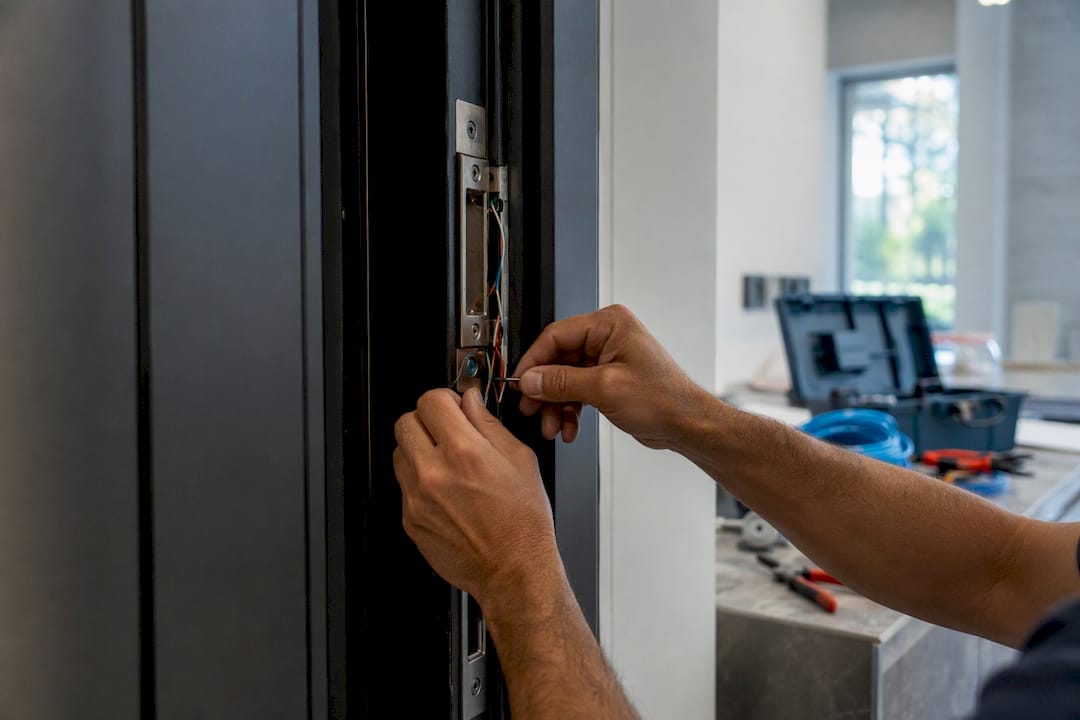
- Door hardware compatibility. Match the panel’s relay output to an electric strike or magnetic lock’s voltage and signal type, and confirm REX (request-to-exit) sensor wiring and appropriate gauge for the run length.
- Mounting and site prep. Flush-mount boxes look better and resist tampering, but they require wall prep time that surface mounts skip.
Pro Tip: The single most common installer callback isn’t a broken panel. It’s a relay mismatched to the door hardware, or a PoE switch that ran out of budget once a second or third panel got added to the same run.
How Do You Choose the Right Vendor and System?
Start with your building’s own profile before comparing vendors: entry point count, resident demographics, existing wiring condition, and whether gates or elevators need integration. A five-unit walkup and a 300-unit high-rise with a parking gate need entirely different architectures, even if both want “video intercom.”
Decision criteria worth weighing:
- Number of entry points and whether they share a network backbone.
- Resident mix: mobile-native tenants versus residents who prefer a phone call.
- Existing wiring: reusable conduit versus a full retrofit.
- Gate and elevator integration needs, which usually require dedicated relay outputs.
- Budget split between one-time installation and any recurring subscription fees.
When evaluating vendors, ask these questions directly:
- What is the PoE wattage requirement per panel, and what’s the total switch budget for the full installation?
- What’s the UPS/battery backup plan, and how many hours of runtime does it provide?
- What relay specifications does the panel support, and is it compatible with our existing electric strikes or maglocks?
- What integration endpoints exist for our video management system or access control platform?
- Can you provide a sample wiring diagram and a defined acceptance test plan before installation begins?
Treat vagueness on any of these as a red flag. A qualified installer should hand over wiring diagrams, documented test results, and a firmware update policy without hesitation. If a proposal skips that documentation, ask again before signing.
What Does an Apartment Video Intercom Cost to Install?
Installed cost ranges vary by entry-point count more than by brand. A single-entry building with one panel and one door release typically runs at the lower end of the range, while multi-entrance properties with gate and elevator integration climb well beyond that, mainly due to added wiring runs and panel counts rather than the hardware itself.
Subscription-based cloud platforms typically bundle mobile app access, remote management, and firmware updates, while perpetual-license or fully on-prem systems avoid recurring fees but shift update and hosting responsibility onto the building. Cloud and mobile platforms add conveniences like visitor passes and delivery management, but that convenience typically comes with a recurring subscription cost worth comparing against a one-time licensed system over a five-year horizon.
Hidden costs to budget for separately:
- Door hardware upgrades if existing strikes or maglocks aren’t compatible with the new panel’s relay output.
- PoE switch capacity upgrades when the current switch can’t power additional panels.
- Wall repair or flush-mount conversion at the entry point.
- Trenching or conduit work for buildings without existing low-voltage pathways to the panel location.
Field-Tested Troubleshooting and Maintenance Guidance
Most intercom failures trace back to one of three causes, and YDA Security Systems NYC’s technicians see the same patterns across Manhattan, Brooklyn, Queens, and Staten Island buildings. Incorrect PoE budgeting or incompatible relay wiring between the panel and the door lock causes the majority of intermittent failures we get called out for, and these show up as “ghost” issues that come and go without an obvious pattern. A panel that’s underpowered because a heated camera or keypad quietly exceeded the PoE budget will often behave normally most of the day and drop out during cold mornings or peak network load.
A basic maintenance schedule catches most of this before it becomes a resident complaint:
- Monthly: test the door release function at every entry point.
- Quarterly: check UPS battery health and runtime under load.
- Annually: apply firmware updates and review VLAN configuration against current network changes.
Pro Tip: When troubleshooting an intermittent panel, check the PoE switch’s total draw first. Adding one more panel to an already-maxed switch is the most overlooked cause of random reboots.
A proper installation includes a site survey, wiring diagrams, an acceptance test before handover, and complete documentation, backed by a one-year warranty. If your current system is acting up, our guide on what to do when an apartment intercom stops working walks through the same diagnostic steps our technicians use on-site.
How Intercoms Integrate With Access Control, VMS, and Property Management Software
A video intercom rarely operates alone. It typically ties into a building’s video management system so a call event at the door triggers a recording clip, and it shares credentials with access control readers so one resident profile works at both the lobby door and the parking gate. Shared credentialing also draws on the same RFID and proximity-card technology used in broader access control systems, which is worth understanding before specifying reader hardware.
Guest and delivery flows matter operationally, too. Temporary access codes, mobile keys sent through a resident app, and QR passes for one-time visitors all reduce front-desk calls while keeping an audit trail of who entered and when. For buildings adding door-release automation to their intercom setup, this logging becomes especially valuable during incident reviews.
Multi-building portfolios face a separate decision: centralized dashboards that let one team manage every property’s credentials, or local control at each building. Centralized management scales better for provisioning new residents but requires the network isolation discussed earlier to prevent one building’s issue from affecting another.
Get a Site Survey From a Licensed NYC Installer
Choosing between telephone entry, cloud video, and wired IP is only half the job. Getting the PoE budget, relay wiring, and network isolation right on day one is what determines whether the system still works cleanly in year three. That’s the gap YDA Security Systems NYC closes for property owners and managers across Manhattan, Brooklyn, Queens, and Staten Island.
Every engagement starts with a site survey that documents your existing wiring, network capacity, and door hardware, followed by a written specification before any equipment gets ordered. Our licensed and insured technicians have completed more than 5,000 jobs, and every job includes acceptance testing plus a one-year warranty on the work. We also support the door hardware side directly, matching electric strikes and maglocks to the intercom’s relay output so the two systems actually work together instead of fighting each other.

If your building needs a video intercom installed, upgraded, or diagnosed, schedule a site survey through our security camera and intercom installation service and get a written specification before committing to equipment.
Sources
- Best Video Intercom Systems for Apartments in 2026
- PoE troubleshooting: common PoE issues and solutions
FAQ
What Is the Best Video Intercom System for Apartments?
The best fit depends on building size and resident demographics: IP/cloud video works well for mobile-first mid-size buildings, while telephone entry suits large portfolios or senior communities needing offline reliability.
What Is the Apartment Buzzer Called?
It’s most commonly called a door intercom or buzzer system, and when it includes a camera, it’s referred to as a video intercom or video entry system.
Can I Put a Security Camera on My Apartment Door?
Tenants can typically install a doorbell camera on their own unit door if it doesn’t damage shared property or violate lease terms, but building-wide entry security is handled separately through the property’s intercom and access control system, which YDA Security Systems NYC installs and services for owners and managers.
Do Apartments Have Intercoms?
Most multifamily buildings, especially those built or renovated after basic buzzer systems became standard, have some form of intercom at the main entrance, ranging from simple audio buzzers to full video intercom systems with mobile app integration.
How Does a Video Intercom System Work?
A visitor presses a button at the entry panel, which sends a video and audio call to the resident’s phone, in-unit station, or a connected app, and the resident can view the visitor and remotely trigger the door release relay to grant access.
Recommended
- Wireless Intercom Systems for Apartment Buildings Guide – YDA Security Systems NYC
- Video Intercom Benefits for Homes and Buildings – YDA Security Systems NYC
- Apartment Intercom System with Door Release for Buildings – YDA Security Systems NYC
- Wired vs Wireless Intercom Systems for Apartments – YDA Security Systems NYC

